

Inspect app runs
Inspect a Bub application’s conversation history, then export execution traces when you need model and tool timing. Start with the local tape commands; add Phoenix or Logfire to inspect a run across calls.
This guide uses the app’s CLI and configuration. Tape recording and trace export have separate lifecycles: the default agent records selected conversation and run entries even without a tracing backend. See Events and control for the distinction between events, output streams, and stored records.
Before you begin
Section titled “Before you begin”You need:
- Bub installed and runnable with
bub --help. - One workspace where
bub run "What tools do you have?"can call your configured model. - Docker or Podman if you want to run Phoenix locally.
- An activated application environment if you will add tracing dependencies.
1. Ask Bub for its current tape
Section titled “1. Ask Bub for its current tape”Run an English natural-language task first:
bub run "What tools do you have, and what small tasks are they useful for?"Then ask Bub to inspect the tape that was updated by that turn:
bub run ",tape.info"Expected output looks like this:
name: becda04eb9f7369c__065943a03cbe6395
entries: 98
anchors: 2
last_anchor: session/start
entries_since_last_anchor: 44
last_token_usage: 7458
last_token_cache_hit_rate: 72.50%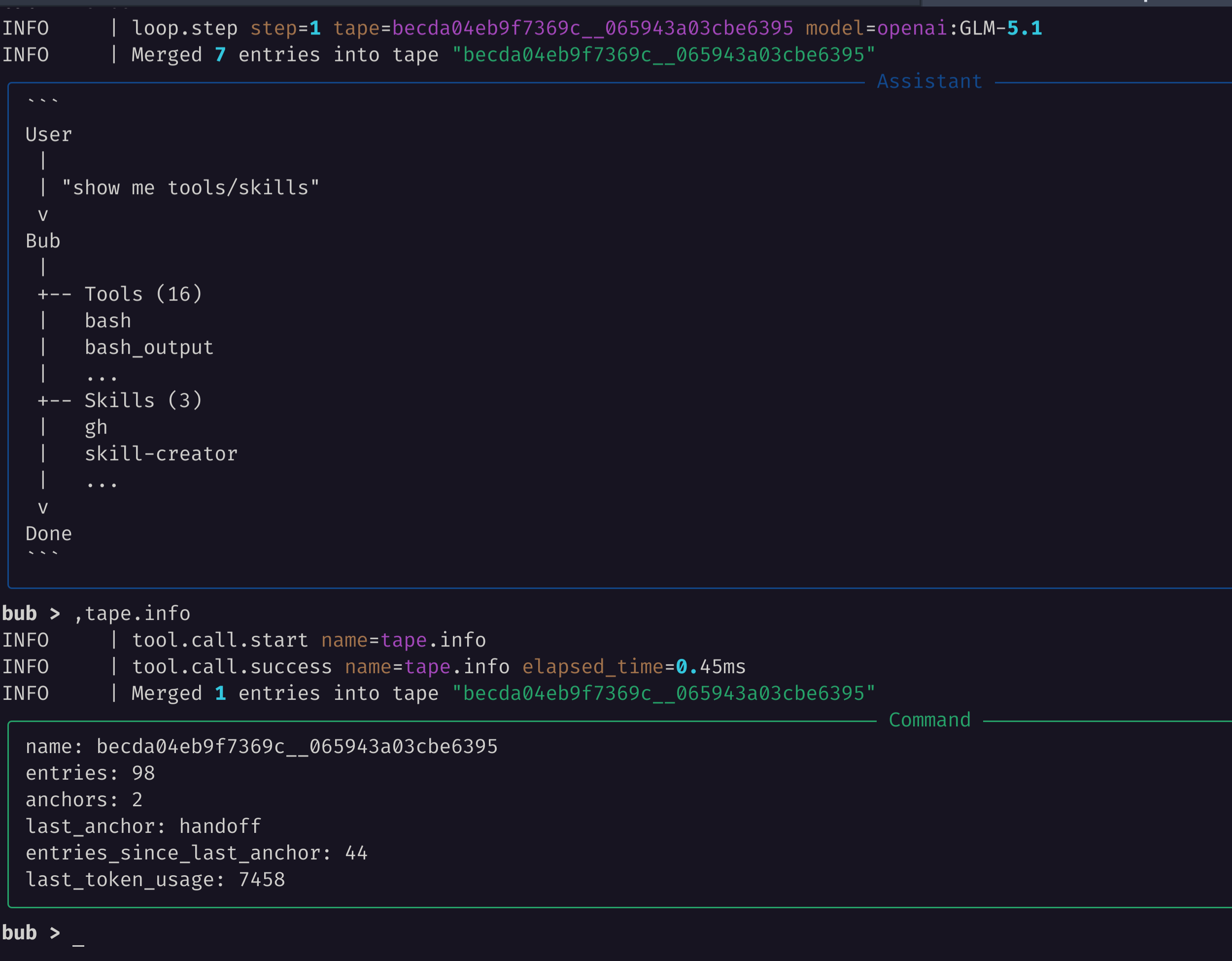
The fields are useful when the model starts behaving oddly:
entriestells you how much history the session has accumulated.anchorsandlast_anchoridentify the boundaries available to the context selector.entries_since_last_anchortells you whether a handoff could shorten the next prompt.last_token_usageappears when token usage has been recorded by the model path.last_token_cache_hit_rateshows the cached share of prompt tokens for that same model call when available.
The tape stores conversation entries and selected run records. The context selector decides which entries become model input; ,tape.info and ,tape.search let you inspect the stored record. See Tape and context for the persistence boundary.
2. Search the tape for symptoms
Section titled “2. Search the tape for symptoms”Use tape.search when you need to find a prior tool call, error, or handoff:
bub run ",tape.search query=loop.step"You can also ask the model to inspect the tape and explain what it sees:
bub run "Inspect the current tape and summarize the last turn."That second command may call the model, so use it only after provider credentials are configured.
3. Start Phoenix locally
Section titled “3. Start Phoenix locally”Run Phoenix with OTLP HTTP ingestion enabled:
docker run --rm --name bub-phoenix \
  -p 6006:6006 \
  arizephoenix/phoenix:latest
Open the UI:
http://localhost:60064. Run Bub with OTLP
Section titled “4. Run Bub with OTLP”In your activated application environment, install the tracing dependencies:
uv pip install "bub[app,trace]"The trace extra includes the OpenTelemetry API, SDK, and HTTP/protobuf OTLP exporter. Bub uses these dependencies to send GenAI spans directly to Phoenix.
In another terminal, run:
OTEL_SERVICE_NAME=bub \
OTEL_EXPORTER_OTLP_TRACES_ENDPOINT=http://localhost:6006/v1/traces \
OTEL_EXPORTER_OTLP_TRACES_PROTOCOL=http/protobuf \
bub run "What tools do you have, and what small tasks are they useful for?"
Then run the local tape check with the same telemetry settings:
OTEL_SERVICE_NAME=bub \
OTEL_EXPORTER_OTLP_TRACES_ENDPOINT=http://localhost:6006/v1/traces \
OTEL_EXPORTER_OTLP_TRACES_PROTOCOL=http/protobuf \
bub run ",tape.info"
OTEL_EXPORTER_OTLP_TRACES_ENDPOINT is the complete trace URL. Alternatively, set OTEL_EXPORTER_OTLP_ENDPOINT=http://localhost:6006; the exporter appends /v1/traces. The trace-specific variable takes precedence. Bub supports http/protobuf (the default), with headers, timeouts, resource attributes, and sampling configured through standard OpenTelemetry environment variables.
An explicit OTLP endpoint selects direct export even if Logfire is installed; Bub does not also configure Logfire. Existing tracer providers are preserved, repeated initialization does not add exporters, and OTEL_SDK_DISABLED=true disables this initialization. The SDK batches exports and drains queued spans on normal process exit.
For an authenticated destination, set OTEL_EXPORTER_OTLP_TRACES_HEADERS (or OTEL_EXPORTER_OTLP_HEADERS). To select a Phoenix project, include x-project-name=my-project in those headers; otherwise Phoenix uses its default project.
5. Inspect the trace in Phoenix
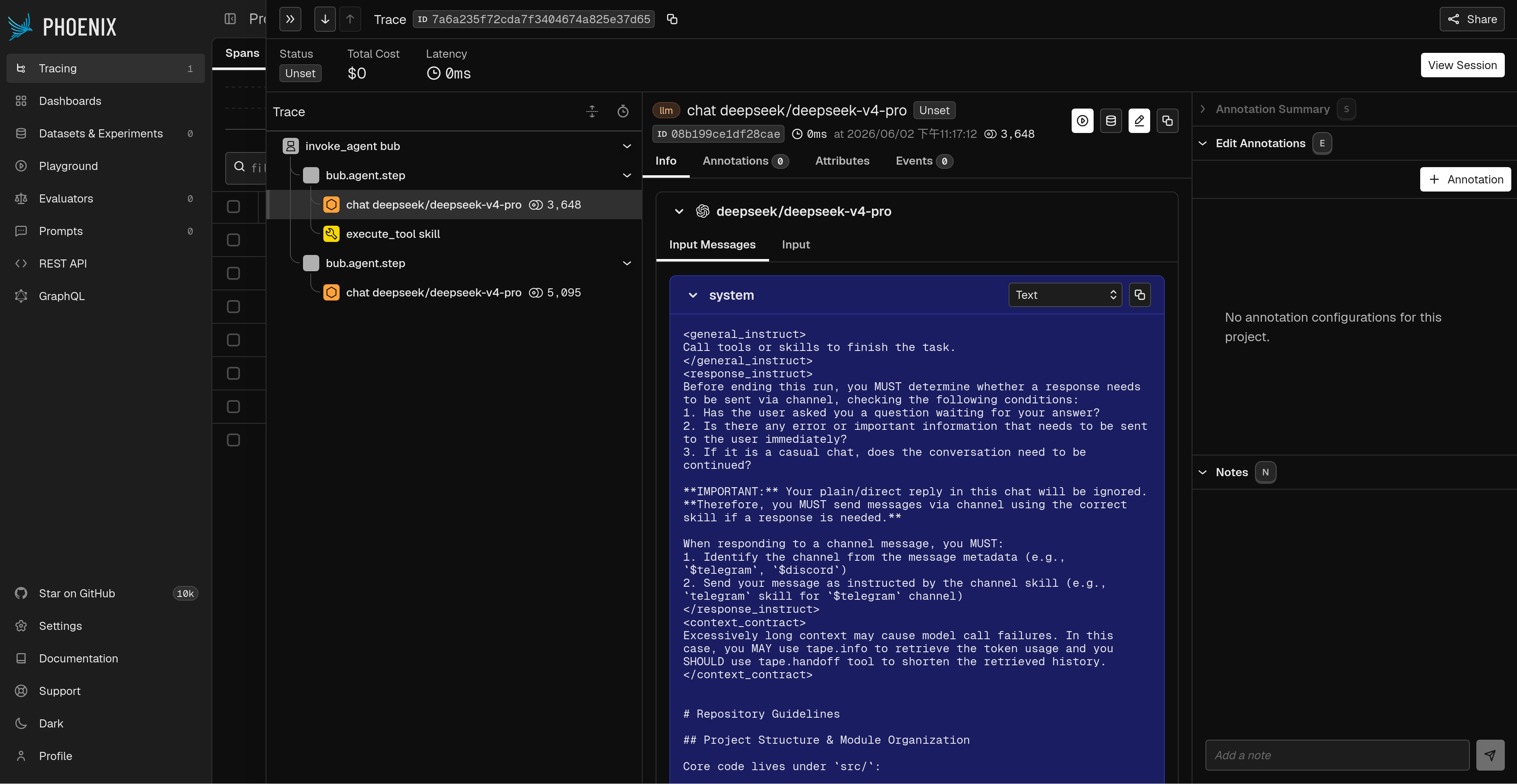
Section titled “5. Inspect the trace in Phoenix”In Phoenix:
- Open the default project.
- Open the most recent trace.
- Look for
invoke_agent bub,chat <model>, andexecute_tool <tool>spans.
This path complements tape inspection:
- Tape answers “what did this Bub session remember?”
- Phoenix answers “how did this Bub agent turn run across model calls, tool calls, and tape updates?”
Use both when debugging production behavior: start with ,tape.info to understand the session state, then use Phoenix to inspect timing, errors, model calls, and tool calls.
Send trajectories to Logfire
Section titled “Send trajectories to Logfire”To send trajectories to Logfire, install the logfire extra, which includes bub[app,trace] and Logfire. With no explicit OTLP endpoint configured, Bub’s CLI configures Logfire at startup; no tracing plugin is required.
In your activated application environment, add Logfire. Clear both OTLP endpoint variables, then authenticate with your Logfire project:
unset OTEL_EXPORTER_OTLP_TRACES_ENDPOINT OTEL_EXPORTER_OTLP_ENDPOINT
uv pip install "bub[logfire]"
logfire auth
logfire projects use
bub run "Inspect this repository and summarize its structure."
For deployment, provide LOGFIRE_TOKEN through your environment. In Logfire’s Agents view, look for bub. Each invocation contains chat <model> and execute_tool <tool> spans. Subagents are nested under the tool that launched them, and runs in the same session share gen_ai.conversation.id.
Trace contents and lifecycle
Section titled “Trace contents and lifecycle”The spans record model inputs and outputs, tool arguments and effective results (after result hooks and spill), token usage when supplied by the provider, and errors. Inline media payloads are omitted from message telemetry. Model fallback updates the model attributes and records failed attempts as events. Token usage is recorded on model spans only, avoiding duplicate counts on agent spans.
Tape events such as loop steps, handoffs, and spill writes appear on the active span. Tape event and chat metadata contain trace_id and span_id for correlation. Tape storage remains independent of telemetry export.
Trace export requires the trace extra and an OTLP endpoint or tracer provider. When embedding Bub, initialize telemetry explicitly: set the endpoint environment variable and call configure_otlp(), or configure your own provider. Bub skips tracing when the optional dependencies are absent:
from bub.tracing import configure_otlp

configure_otlp()  # Reads OTEL_EXPORTER_OTLP_TRACES_ENDPOINT or OTEL_EXPORTER_OTLP_ENDPOINT.
# Create and run Bub using your normal embedding entrypoint.
Streams expose aclose(). Embedders that may stop consuming early should use contextlib.aclosing(stream) so provider streams, tape forks, and spans close promptly. Trace context is active while advancing or closing a stream, then released while consumer code handles the event. Cancellation closes spans and sets bub.cancelled; model failures and timeouts set error status.
Migrating from bub-tapestore-otel
Section titled “Migrating from bub-tapestore-otel”Use native tracing for live agent trajectories. The contrib plugin projects batches of committed tape entries into spans after the work has finished; its span timestamps describe the projection, while step duration is stored separately as an attribute. Native spans measure execution directly, preserve parallel tool timing and subagent parentage, and close on cancellation even when no terminal tape entry is committed.
Use the plugin to project stored tape entries into spans. Native tracing captures execution as it happens, alongside your existing tape storage.
To migrate:
- Install the
traceextra for Phoenix/OTLP, or thelogfireextra for Logfire, and configure the destination as shown here. - Set
BUB_TAPESTORE_OTEL_ENABLED=falseif the contrib plugin is still installed. - Keep your existing tape backend.
Native spans also include OpenInference classification, model/token, message, and tool input/output attributes for Phoenix. These compatibility attributes are separate from the standard gen_ai.* attributes. Loop steps are events on the agent span.
See the contrib plugin implementation for the tape-projection approach.
Clean up
Section titled “Clean up”Stop Phoenix with Ctrl+C if it is running in the foreground. If it is detached, remove it:
docker rm -f bub-phoenixNext steps
Section titled “Next steps”- Tape and context: understand what Bub records and how context is rebuilt.